Your AI is too loud, and your retention numbers know it
Three things happened in our client pipeline this month that point to the same problem.
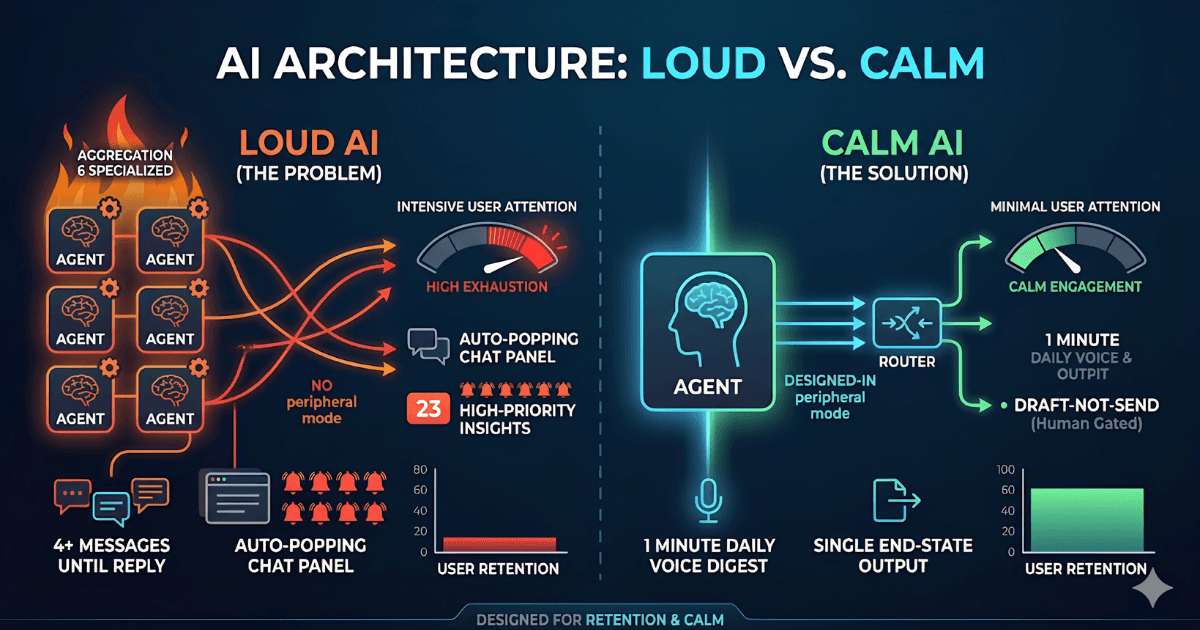
A coaching client's WhatsApp AI assistant — built last year — now sends 4 messages to a lead before the lead replies once. The reply rate dropped from 38% to 11% in nine months. The product manager called it "AI fatigue." The architecture diagram on the wall said it differently: too many agents, too few constraints, no peripheral mode.
A B2B SaaS founder showed me their AI sales rep tool. The dashboard had 14 widgets, 6 live notification streams, and a chat panel that auto-popped every time a "high-intent signal" was detected. Their NPS from internal users was -12. Sales reps were turning the tool off by lunch.
And a fintech founder asked me last week why their AI customer support bot — accurate, multilingual, fast — was getting 2-star reviews. The answer was buried in 200 transcripts: customers didn't want the bot to chat. They wanted the answer. The bot insisted on conversation.
None of these are AI quality problems. They are Calm Tech problems.
This is a design and architecture philosophy, formalised in 1995 by Mark Weiser at Xerox PARC and turned into a usable set of 8 principles by Amber Case in 2015. It is the missing layer in almost every AI product I audit in 2026. This post explains what it is, why it matters more for AI than for any previous technology, and the 8 principles you should apply to your architecture this quarter.
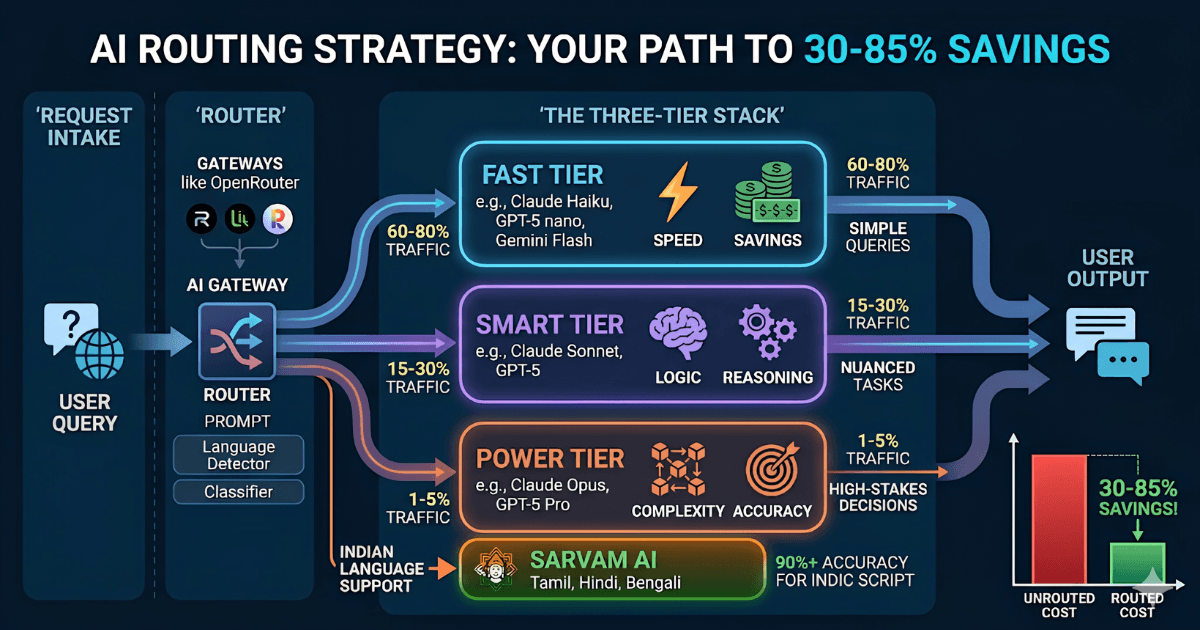
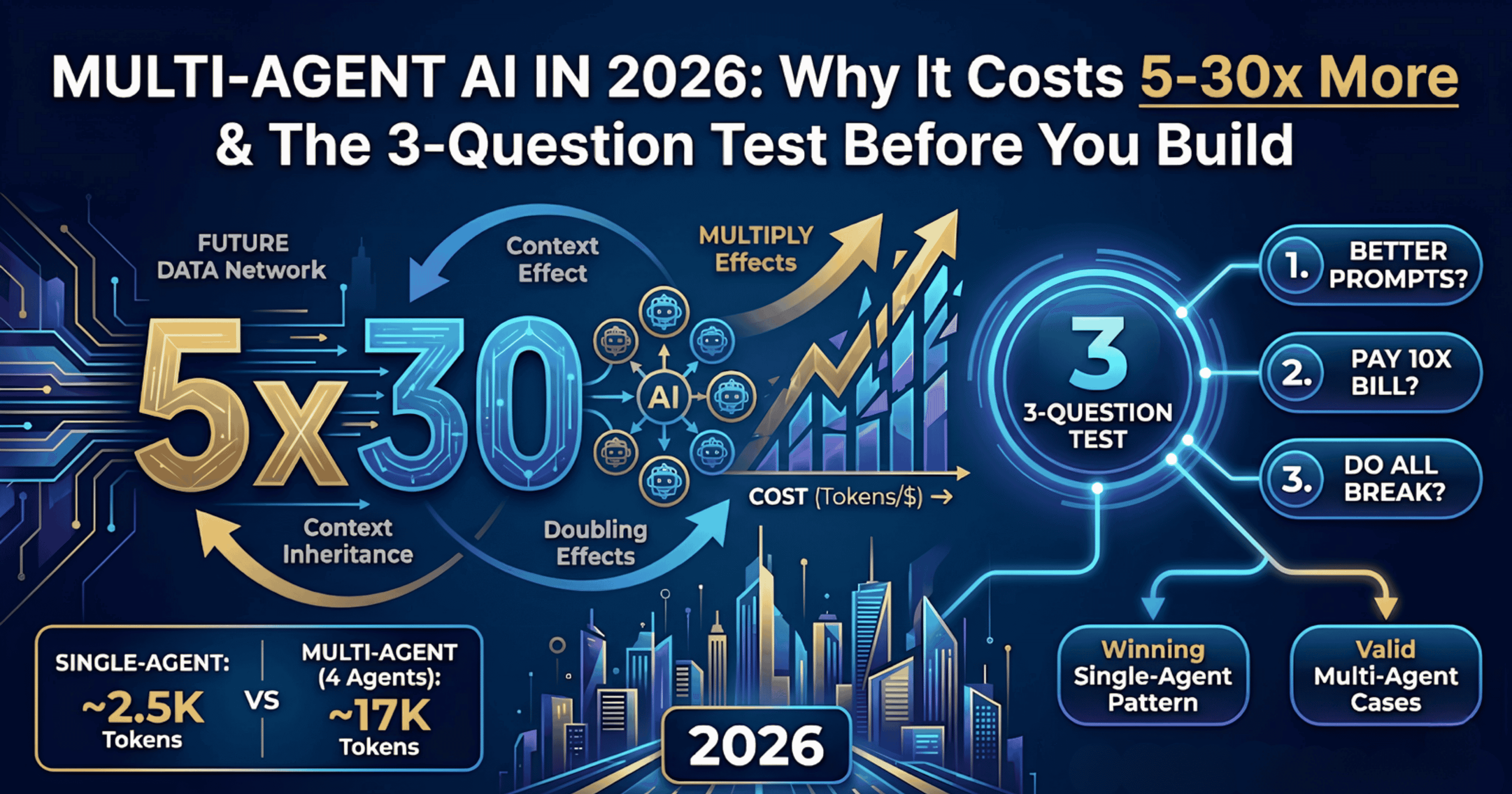
It pairs with two companion pieces: why multi-agent AI costs 5-30x more in production and a founder's guide to LLM model routing. Together they form our point of view on production AI architecture in 2026.
Where Calm Technology came from (Weiser, PARC, Amber Case)
In 1988, Mark Weiser, then chief scientist at Xerox PARC, coined the term ubiquitous computing. He saw the next age of computing not as a personal computer on every desk, but as hundreds of small computers per person — invisible, embedded, ambient.
By 1995, Weiser and his colleague John Seely Brown published a short paper titled The Coming Age of Calm Technology. Their argument: in a world saturated with computing, technology that demands attention will exhaust people. The solution is technology that moves between the centre (when the user wants to engage with it) and the periphery (when the user doesn't). A computer screen and a notification badge are centre-of-attention designs. A weather lamp that glows blue when rain is coming, or a Roomba that vacuums while you sleep, are periphery designs.
Weiser died in 1999. The framework went quiet for almost two decades, surviving mostly in academic HCI literature.
In 2015, designer and researcher Amber Case wrote a book titled Calm Technology: Principles and Patterns for Non-Intrusive Design (O'Reilly Media). She turned Weiser's loose ideas into a tight set of 8 principles. In 2024 she launched the Calm Tech Institute and a certification programme — the framework now has a community, real product certifications (kitchen appliances, fitness wearables, climate devices), and a checklist designers can ship against.
What's striking is that Case's 8 principles were written before ChatGPT, before AI agents, before LLM gateways. And yet they describe the exact architectural problems we now see in production AI almost word-for-word.
Why AI products need Calm Tech more than any previous technology
Web apps demanded attention. Mobile apps demanded more. AI products demand more again — and the reason is structural, not a UX failure.
Era | What it asked the user to do | Attention cost |
|---|---|---|
Web (1995-2010) | Visit a site, click around, read | Bounded — user controls entry and exit |
Mobile (2010-2020) | Receive notifications, react to them, scroll feeds | Always-on — but user can mute, uninstall |
SaaS dashboards (2015-2022) | Check daily, decide based on metrics, take action | Daily ritual — but bounded to working hours |
AI agents (2023-now) | Converse, supervise, verify, correct | Unbounded — every output may need a human in the loop |
The fourth row is the new problem. An AI agent that takes action without human verification can be wrong in ways that are hard to detect. So almost every AI product on the market today adds a human-in-the-loop layer — which means every output becomes a request for attention.
If you don't design for calm explicitly, your AI product compounds attention demands until the user resents it. Resented products churn.
This is why Calm Tech is not a nice-to-have UX layer in 2026. It is a core architectural concern. The architectural decisions — where the model lives, how it communicates, when it interrupts, what the fallback path looks like, how many agents the system has — directly determine whether the product is calm or exhausting.
Principle 1 — AI should require the smallest possible amount of attention
Case's original principle reads "Technology should require the smallest possible amount of attention." For AI, this translates to:
The AI should do the work in the background where possible, surface only when it must
The AI should never ask the user "what do you want to do?" when it has enough context to guess correctly 90%+ of the time
The AI should consolidate notifications, not multiply them
Architectural translation: reserve real-time chat interfaces only for use cases where the user is genuinely in conversation. For everything else — summaries, classifications, enrichments, automations — let the AI run async and emit a single end-state output.
This is why multi-agent systems are dangerous: every agent in the chain produces output that might need human verification. Single-agent + good prompts produces one output to verify.
Principle 2 — AI should inform and create calm, not anxiety
An AI dashboard with 14 widgets and 6 live data streams is the opposite of calm. So is an AI agent that surfaces "23 high-priority insights" every morning.
For AI specifically, this principle means:
Default the AI to quiet states — show 1-3 things, not 23
Replace counters and badges with peripheral indicators (a single colour change, a gentle pulse)
Aggregate weak signals before alerting. A single "new lead came in" notification per hour is calmer than 4 mid-hour pings
The most successful AI feature we've shipped at Rian Infotech in 2026 is a daily 60-second voice digest for a coaching client — replacing what used to be 12 push notifications per day. Engagement on the digest is 89%. Engagement on the old notifications was 18%.
Principle 3 — AI should make use of the periphery
Periphery is the original Weiser concept and the hardest one to design for in AI. The principle: technology should be able to recede to the background without disappearing entirely, and return to centre attention only when needed.
For AI products this means:
The AI should have a "quiet mode" by default — readable at a glance, ignorable without consequence
The AI should escalate to interruption only when the stakes justify it (rare)
The AI's outputs should be designed for glanceability — short, structured, scannable
Architectural translation: design a 3-tier notification system before you write a single LLM call. Tier 1: peripheral (status icon, daily digest). Tier 2: ambient (inbox, log). Tier 3: interrupt (push notification, email, SMS). Default everything to Tier 1. Move only what's truly urgent up to Tier 3.
Principle 4 — AI should amplify human capability, not replace human judgment
This is Case's "amplify the best of technology and the best of humanity" principle, sharpened for AI.
The most exhausting AI products are the ones that try to think for the user. The calmest ones do the boring work the user doesn't want to do, then hand back a clean output.
A practical test: when your user reads the AI's output, are they evaluating it (exhausting) or accepting it (calm)? If they're evaluating most of the time, your AI is too autonomous. Pull it back.
Pattern | Calm Tech rating | Why |
|---|---|---|
AI suggests the next action, user approves | Calm | User stays in control, low cognitive load |
AI takes the action, notifies the user after | Calm (if reversible) | User only attends when something is wrong |
AI asks the user to choose between 5 options | Loud | Pushes cognitive work onto the user |
AI generates 3 versions, user picks one | Loud | Same problem — user is doing the work |
Principle 5 — AI can communicate, but doesn't need to speak
Most AI products in 2026 default to a chat interface. Chat is the loudest possible mode of communication: it demands turn-taking, language production, and verification on every exchange.
Calm Tech asks: what's the minimum communication mode that solves the problem? Often it's a number, a colour, a single icon, a row added to a table, or a "done" signal. Chat is the right interface for genuine conversation. It is the wrong interface for status, results, or notifications.
If your AI product opens with a chat box, ask: would my user prefer a one-click button that does the same thing? In 60% of cases, the answer is yes.
Principle 6 — AI should work even when it fails
This is the architectural principle most ignored in production AI today. Case's original: "Technology should work even when it fails." For AI specifically:
When the LLM call times out, the system should fall back to a deterministic path, not to a blank screen
When the AI is uncertain, it should say so and offer a clean handoff — not hallucinate confidently
When the AI is wrong, the cost of being wrong should be bounded (an editable draft, a reversible action, a flagged item — not an irreversible email send)
The architectural patterns that support this:
Pattern | What it does | When to use |
|---|---|---|
Retry with smaller model | If Sonnet times out, retry with Haiku before failing | Cost-sensitive read-only operations |
Deterministic fallback | If all models fail, return a hand-written default response | Customer-facing always-on interfaces |
Confidence-gated action | AI only takes action if its confidence score exceeds threshold | Anything irreversible (emails, payments, deletions) |
Draft-not-send | AI prepares an output, human triggers the send | External communications, public posts, customer messaging |
For the architectural cost of these patterns — and which model to route to in fallback — see our guide to LLM model routing.
Principle 7 — The right amount of AI is the minimum needed to solve the problem
If a regex solves your problem, don't use an LLM. If a single-shot prompt solves your problem, don't use an agent. If one agent solves your problem, don't build a multi-agent system.
This is the principle that saves the most money in production. The default move in 2026 is to over-engineer: founders see a problem and reach for the most impressive architecture, not the smallest one that works.
A quick rule we use at Rian Infotech when scoping client work:
Problem type | Minimum architecture | What founders try to build |
|---|---|---|
Extract fields from a form | Regex + 50 lines of code | "Multimodal LLM-powered extraction agent" |
Classify a lead as hot/warm/cold | Rule-based scoring + 1 LLM call for edge cases | "AI sales rep agent with BANT scoring sub-agents" |
Reply to a customer support ticket | RAG over support docs + Haiku-tier LLM | "Multi-agent system with a router, retriever, generator, validator" |
Generate a personalised email | Single prompt + 5-line template | "Persona agent + research agent + writer agent + reviewer agent" |
The principle: start at the smallest viable architecture. Add complexity only when you have evidence the smaller one is failing.
Principle 8 — AI should respect social norms and human context
The original principle is about avoiding social discomfort — a smartwatch that buzzes loudly during a funeral, a notification that announces itself out loud in a meeting. For AI in 2026 the principle extends further:
Multilingual AI should match the user's language and code-switching naturally — not force English defaults
AI should be aware of cultural and regional context (don't WhatsApp a Saudi customer on a Friday afternoon)
AI should know the difference between business hours, personal hours, and weekends — and behave accordingly
AI should respect privacy norms — not surface information the user expected to be quiet
AI should be aware of holidays, fasting periods, festivals, and regional pauses
This is the principle where most globally-deployed AI products fail. A bot designed in San Francisco that fires "good morning" pings at 9:00 PT to users in Bangalore is rude. A multilingual AI that sometimes replies in English when the user wrote in Hinglish is jarring. These are architectural problems disguised as cultural ones.
5 Calm Tech anti-patterns that kill AI products in production
These are the architecture mistakes we see most often in audits in 2026. If your product has more than two of them, your retention numbers are leaking quietly.
Anti-pattern | What it looks like | The fix |
|---|---|---|
Chat-first when no chat is needed | Every interaction starts with a chat box, even for one-click tasks | Audit each user job. Replace 60%+ with a single button or form |
Always-on listening | Voice agent listens continuously, interrupts mid-task | Push-to-talk or explicit invocation only. Default to silent |
Notification flooding | AI emits a notification per signal, multiple per hour | Aggregate to one daily digest. Move only true-urgent to interrupt tier |
Hallucination as confidence | AI never says "I don't know," always produces an answer | Add explicit "uncertainty" output. Hand off to human under threshold |
Hard fail = blank screen | When the model is down, the product is down | Add deterministic fallback path + smaller-model retry layer |
The Calm Tech decision table for AI architecture
Use this table when you're about to add an AI feature to your product. For each row, decide which side you're on. If most answers are in the right column, you're likely about to ship a loud product.
Decision | Calm choice | Loud choice |
|---|---|---|
Interface mode | Background async + final output | Live chat + streaming tokens |
Notification frequency | 1 daily digest | 1 per event |
Action authority | Draft for human to send | AI auto-sends |
Number of agents | 1 well-prompted agent | 5+ specialised agents |
Model tier default | Smallest viable (Haiku, Gemini Flash) | Largest available (Opus, GPT-5) |
Failure mode | Deterministic fallback | Error message or blank screen |
Uncertainty handling | Explicit "I don't know" + handoff | Always produce an answer |
Verification cost per output | Glanceable (0-5 seconds) | Read-and-judge (30+ seconds) |
A 12-point Calm Tech audit for your AI product
Run this audit on your AI product before your next release. If you score below 8/12, you're likely shipping a loud product that will churn.
Can the AI run in the background without requiring user input?
Does the AI emit at most 1 notification per day per user by default?
Is there a quiet mode that's enabled by default?
Are AI outputs glanceable (readable in under 5 seconds)?
Does the AI have a deterministic fallback when the model fails?
Can the AI say "I don't know" explicitly?
Is the smallest viable model the default tier?
Are irreversible actions gated by a confidence threshold or human approval?
Does the AI respect time zones, holidays, and business hours?
Does the AI handle multilingual / code-switching gracefully?
Is the AI architecture single-agent unless multi-agent is justified?
Does the AI consolidate weak signals before alerting?
Real production example — applying Calm Tech to a multilingual immigration agent
We are shipping a multilingual AI agent for a Canadian immigration consultancy (Toronto-based, going live mid-2026) that handles Bengali, Hindi, and English with per-message auto-detection. The first architecture draft had:
Live chat interface as the primary mode
4 specialised agents — intake, qualification, scheduling, escalation
Real-time notifications to the consultant on every customer reply
Opus-tier model as default for "best quality"
Hard failure if the model timed out
It would have worked. It would also have been loud, expensive, and exhausting for the consultant who had to verify every output.
The Calm Tech audit pushed us to redesign:
Single agent with structured prompts — 80% fewer LLM calls
Async by default — customer replies queued, batched into a daily digest for the consultant
Tier 1 model (Sonnet 4.6) as default, with Haiku fallback and Opus reserved for high-stakes drafting
BANT-style qualification handled by deterministic logic, AI only handles freeform conversation
Holiday-aware (Eid, Diwali, Canadian statutory holidays) — agent goes silent on these days
Confidence-gated escalation — only routes to consultant when confidence is below threshold or stakes are high
HMAC-signed webhook fallbacks with 3-retry delivery and audit-trail logging — so the system survives partial outages
The result: roughly 5x lower projected LLM costs, materially fewer escalations to the human consultant, and an architecture that holds up when one piece fails. The consultant supervises the system once a day instead of once an hour.
The takeaway for founders shipping AI in 2026
The AI products that will win the next two years are not the loudest, the most agentic, or the most "intelligent." They will be the ones that disappear into the user's workflow and resurface only when the user needs them.
The architecture decisions you make in the first 90 days of building an AI product determine whether your product can ever be calm. Bolt-on calm — adding a "quiet mode" toggle, batching notifications, adding a daily digest — is possible but expensive and partial. Designed-in calm is cheaper, more durable, and shows up directly in retention numbers.
If you're a founder in the architecture phase of an AI product right now, the highest-leverage decision you can make this week is to run the 12-point audit on your current design and fix the bottom three answers before you ship.
If you'd like an outside read on your AI architecture — what's calm, what's loud, what's costing you 5x more than it should — we run 2-week architecture reviews for early-stage AI products and 3-6 month fractional CTO engagements for founders building production AI systems.
Frequently asked questions
What is Calm Technology?
Calm Technology is a design framework coined by Mark Weiser at Xerox PARC in 1995 and formalised into 8 principles by Amber Case in her 2015 book Calm Technology: Principles and Patterns for Non-Intrusive Design. It argues that technology should require the minimum possible amount of human attention, move between centre and periphery as needed, and respect human and social context.
Why does Calm Tech matter specifically for AI products in 2026?
AI products demand more attention than any previous technology because every output may need human verification. Without explicit Calm Tech design, AI products tend to compound attention demands — more notifications, more chat threads, more reviews per day — until users resent the product. The architectural decisions in an AI product directly determine how calm or loud it feels.
What are the 8 principles of Calm Technology?
Amber Case's 8 principles are: (1) technology should require the smallest amount of attention; (2) it should inform and create calm; (3) it should make use of the periphery; (4) it should amplify human capability; (5) it can communicate without needing to speak; (6) it should work even when it fails; (7) the right amount of technology is the minimum needed; (8) it should respect social norms.
Is Calm Tech the same as minimalism?
No. Minimalism is about removing visual or feature noise. Calm Tech is about respecting human attention and context. A minimalist AI product can still be loud (a chat box on a blank page is minimalist and exhausting). A complex AI product can still be calm if it surfaces work only when needed.
Should I always default to single-agent over multi-agent AI?
Yes, unless you have strong evidence that single-agent is failing. Multi-agent systems compound cost (5-30x in production) and compound attention demands on the human reviewer. Start single-agent, ship to production, and only add agents when one specific failure mode justifies the cost.
How do I make an AI chatbot more calm?
The first question is whether you need a chatbot at all. If yes — design for short, glanceable responses; batch notifications; default to silent unless invoked; gate irreversible actions; respect time zones and language. If a one-click button can replace 60% of the chatbot's job, build the button instead. Chat is the loudest possible AI interface.
What's the easiest Calm Tech improvement I can ship this week?
Replace per-event notifications with a single daily digest. This single change typically reduces AI-related notification volume by 80-95% and increases user engagement with the AI outputs because they're now consolidated and worth reading. The architectural effort is small (a scheduled job + a template) and the retention impact is usually visible within two weeks.
Frequently Asked Questions

Rishav Shankar
Rishav Shankar is a calm-tech architect who blends AI, engineering, and psychology to design systems that think before they act. He builds products that turn complex human problems into intuitive digital experiences, redefining how founders and teams operate. At the intersection of automation, strategy, and imagination, Rishav is creating the future one intelligent workflow at a time.
Comments
Loading...